Build a custom mutator
5. Update the block shape
The resizable_list needs to add or remove inputs depending on the number
of items in the list. This means that the shape of the block should be updated
based on the itemCount.
A block with itemCount==1 should have just one input:
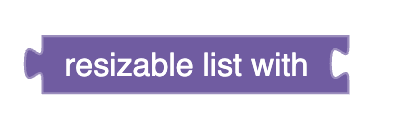
A block with itemCount==2 should have two inputs:
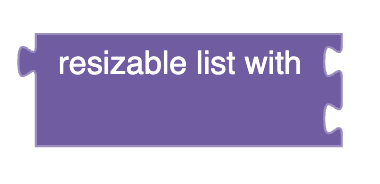
And so on. The block implemented in this codelab will always have a minimum of one input.
Note that blocks with mutators don't always need to change their shape based on the extra state. In this case, updating the shape is necessary.
Adding an input
The same updateShape() function will be responsible for updating the shape
regardless of whether an input has been added or removed. First, focus on adding
a new input. Add the following function and code to the LIST_MUTATOR:
export const LIST_MUTATOR = {
    ...

    updateShape: function() {
        // Add new inputs.
        for (let i = 1; i < this.itemCount; i++) {
            if (!this.getInput('ADD' + i)) {
                this.appendValueInput('ADD' + i).setAriaLabelProvider(
                    () => 'value ' + (i + 1)
                );
            }
        }
    },
};
The updateShape() function adds itemCount - 1 inputs, since the block
starts with 1 input. This function also sets the aria label for each input
manually, so that screenreaders distinguish clearly between each input.
Finally, note that the inputs are named numerically. The input that you defined
in the block definition is called ADD0, so subsequent blocks are named ADD1,
ADD2, ADD3, etc.
Removing an input
To remove an input, remove the appropriate number of inputs from the end of the
list. Finish the updateShape() function with the code below:
export const LIST_MUTATOR = {
    ...

    updateShape: function() {
        // Add new inputs.
        for (let i = 1; i < this.itemCount; i++) {
            if (!this.getInput('ADD' + i)) {
                this.appendValueInput('ADD' + i).setAriaLabelProvider(
                    () => 'value ' + (i + 1)
                );
            }
        }
        // Remove deleted inputs.
        for (let i = this.itemCount; this.getInput('ADD' + i); i++) {
            this.removeInput('ADD' + i);
        }
    },
};
Updating after load
Since this list block will add or remove inputs based on the value of
itemCount, it is important to update the physical shape after deserialization.
Add a call to updateShape() in loadExtraState():
loadExtraState: function(state) {
    this.itemCount = state['itemCount'];
    this.updateShape();
},
Next steps
Although updateShape() is complete, only the deserializer calls it. The next
step of creating a mutator is considering how the user will interact with the
mutator in order to modify the extraState.