Customizing a Blockly toolbox
4. Change the look of a category
Change the background of the category
In the default ToolboxCategory class, the addColourBorder_ method adds a strip of color next
to the category name. We can override this method in order to add colour to the entire category div.
Add the following code to your CustomCategory class.
/** @override */
addColourBorder_(colour){
  this.rowDiv_.style.backgroundColor = colour;
}
The colour passed in is calculated from the categorystyle attribute set on the category definition.
For example, you can see in your toolbox.js file that the "Logic" category definition looks like:
{
  kind: 'category',
  name: 'Logic',
  categorystyle: 'logic_category',
  ...
}
The logic_category style (defined in Blockly's theme) is:
"logic_category": {
    "colour": "210"
  }
You can also set the colour directly via the color attribute on the category definition.
{
  kind: 'category',
  name: 'Logic',
  colour: '210',
}
For more information on Blockly styles please visit the themes documentation.
Add some CSS
Open your application page to see your updated toolbox. Your toolbox should look similar to the below toolbox.
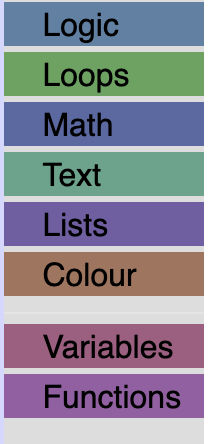
We are going to add some CSS to make it easier to read, and to space out our categories.
Create a file named toolbox_style.css in the same directory as index.js.
Then, import the new file in index.js:
import './toolbox_style.css';
Importing a .css file into a JavaScript file isn't standard JavaScript. It
works here because this project's webpack config (webpack.config.js) has a
rule that bundles and injects .css files.
Copy and paste the following CSS into your toolbox_style.css file.
/* Makes our label white. */
.blocklyToolboxCategoryLabel {
  color: white;
}
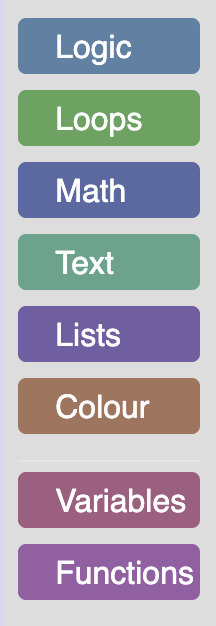
/* Adds padding around the group of categories and separators. */
.blocklyToolboxCategoryGroup {
  padding: 0.5em;
}
/* Adds space between the categories, rounds the corners and adds space around the label. */
.blocklyToolboxCategory {
  padding: 3px;
  margin-bottom: 0.5em;
  border-radius: 4px;
}
The result
Open the running application to see your toolbox.