Localization and translation
Blockly uses a localization system to translate user-visible text into a variety of languages. If you add a feature to Blockly core that requires new user-visible strings, you must add those strings to the message file so that they can be translated by Translatewiki. For information about adding localization tokens for your own application, see Localization.
Add a new localization token to Blockly core
New user-visible strings must be added to Blockly.Msg. Follow
these steps to ensure that the new strings can be properly translated:
- Add your new string with an appropriate name and description to the
msg/messages.jsfile. - Run
npm run messagesto automatically add your translation to themsg/json/qqq.jsonandmsg/json/en.jsfiles. This step may also changemsg/json/constants.jsormsg/json/synonyms.jsin some cases. - Inspect the automatically-generated files for correctness. Note that the
script may remove the
@metadatasection at the beginning ofqqq.json. If this happens, you should carefully revert that change so that your new string is added but the@metadatais not removed. - In your feature code, reference the new string with
Blockly.Msg['MY_NEW_MESSAGE']. - Commit all of the changes to the
msgfiles alongside your feature code.
For example, if you add this code to msg/messages.js:
/** @type {string} */
/// This is a hint to translators about the context for the message.
Blockly.Msg.MY_NEW_MESSAGE = 'This is a string that users will see!';
Then run npm run messages, you should see the following changes in
msg/en.json:
// ...
    "MY_NEW_MESSAGE": "This is a message that users will see!",
// ...
and in msg/qqq.json:
// ...
    "MY_NEW_MESSAGE": "This is a hint to translators about the context for the message.",
// ...
Then you can reference this string in code with Blockly.Msg['MY_NEW_MESSAGE'].
Translation hints
The triple-slash comment in msg/messages.js is shown to TranslateWiki users as
supplementary information when translating. Provide context for where the
message will be shown to users. If the message includes parameters (e.g., %1),
explain what the parameters mean.
Here is an example of a good translation hint that explains the parameters and provides a link to more information.
/** @type {string} */
/// block text - Repeatedly counts a variable (%1)
/// starting with a (usually lower) number in a range (%2),
/// ending with a (usually higher) number in a range (%3), and counting the
/// iterations by a number of steps (%4).  As in
/// [https://github.com/RaspberryPiFoundation/blockly/wiki/Loops#count-with
/// https://github.com/RaspberryPiFoundation/blockly/wiki/Loops#count-with].
Blockly.Msg.CONTROLS_FOR_TITLE = 'count with %1 from %2 to %3 by %4';
Context types
Many of the hints use a prefix to explain the context of a message. The common prefixes include:
- block text
- button text
- context menu
- dropdown
- math
- toast notification
- tooltip
If your message appears in one of these context, use the appropriate prefix.
Synonyms
Sometimes a message key needs to be changed, but the translations don't. In that case, you can set the old message as a synonym of the new message, like so:
/** @type {string} */
Blockly.Msg.CONTROLS_FOR_INPUT_DO = Blockly.Msg.CONTROLS_REPEAT_INPUT_DO;
Optional messages
Some message strings are unlikely to need translation except in certain circumstances, for example, proper nouns or symbols. In Blockly, help URLs are often marked optional.
Languages are only committed to the Blockly repository if they are at least 25% complete. Thus, marking messages that are unlikely to need translating as optional will help those languages meet the threshold without needing to complete the optional translations.
/** @type {string} */
/// {{Optional}} math - The symbol for the binary operation addition.
Blockly.Msg.MATH_ADDITION_SYMBOL = '+';
Notranslate items
The colours used for default block categories are marked {{notranslate}}. These colours are not intended to be
localized, but are in the localization system so that developers can easily
change the colours of blocks in the default categories. If you
add new block categories, use the {{notranslate}}
directive. If you add a different type of message that you think should never be
translated, consider whether the localization system is the right place for the
string.
/** @type {string} */
/// {{Notranslate}} Hue value for all logic blocks.
Blockly.Msg.LOGIC_HUE = '210';
Translate text
Students shouldn't have to struggle with learning English at the same time as they're learning computer science concepts. If you are a native speaker of a language other than English, we'd appreciate your assistance in reaching the 95% of the world that doesn't speak English natively.
Translatewiki
Translations for Blockly are handled by Translatewiki.
- Sign up to become a translator at translatewiki.net.
- Do some test translations to get permission to translate (choose a language in the upper-right).
- Briefly read over the style guide for Blockly's translations.
- Go to Blockly's message group (choose a language in the upper-right), and start translating!
New translations may take a few months to show up on the live site.
Klingon translations
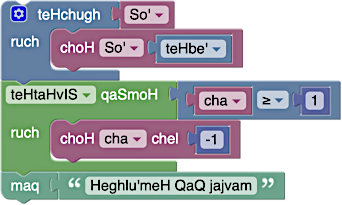
On 1 April 2014 we released a Klingon translation of Blockly. Klingon is an unusual choice for a translation, and on this page we wanted to give some context on the hows and whys, as well as how you can help.
Why?
Blockly has been translated into over 40 languages, including RTL languages such as Arabic and Hebrew. We feel that it is important that novice programmers are able to learn the fundamentals of programming in their own language, before making the transition to conventional English-based programming languages.
Klingon is a real language in every sense of the word. It is not just a collection of made-up words thrown together for a movie. Instead, it has been crafted by linguists over the course of decades. The Klingon language has a complicated grammar that is completely unique.
Consider word order. English follows the Subject-Verb-Object order ("The cat eats the food."). Hungarian follows the Object-Subject-Verb order ("The food the cat eats."). Hebrew follows the Verb-Subject-Object order ("Eats the cat the food."). Klingon is the most bizarre, with Object-Verb-Subject order ("The food eats the cat."). Supporting Klingon is the ultimate test of Blockly's flexibility. Block inputs need to be reordered, suffix groups need to be added, rules for plurals need to be rethought. Infrastructure improvements made during the course of translating to Klingon help us support all languages.
How?
Most of Blockly's translations are done by volunteers using Translatewiki. Unfortunately, Klingon is not in their language matrix. As a result, Klingon contributors need to edit the translation manually:
See the en files in each directory for the English phrases (including
those not yet translated to Klingon).
We actively do not want tooltip messages or help URLs translated since they
offer useful context for those new to Klingon.
All phrases must be manually translated. Bing Translate produces such
translations as "Library" -> "be'nI''a'wI', Datu'" which actually means
"discover my big sister".
Clearly this would be an inadvisable phrase to use in a Klingon environment.