Extensions and mixins
Extensions are functions that are run on a block during initialization. These often add some custom configuration or behavior to a block. Mixins allow you to to add properties or helper functions to a block, but not run them immediately.
You only need to use extensions or mixins when you define a block with JSON. If
you use JavaScript to define a block, you can call initialization functions
directly in init and add methods or properties directly to the definition.
Extensions
Extensions are functions that run on each block of a given type as the block is created. For example, they may add custom configuration (e.g. setting the block's tooltip) or custom behavior (e.g. adding an event listener to the block).
// This extension sets the block's tooltip to be a function which displays
// the parent block's tooltip (if it exists).
Blockly.Extensions.register('parent_tooltip_extension', function () {
  // this refers to the block that the extension is being run on
  var thisBlock = this;
  this.setTooltip(function () {
    var parent = thisBlock.getParent();
    return (
      (parent && parent.getInputsInline() && parent.tooltip) ||
      Blockly.Msg['MATH_NUMBER_TOOLTIP']
    );
  });
});
Extensions have to be "registered" so that they can be associated with a string
key. Then you can assign this string key to the extensions property of your
block type's JSON
definition to apply
the extension to the block.
{
 //...,
 "extensions": ["parent_tooltip_extension",]
}
You can also add multiple extensions at once. Note that the extensions
property must be an array, even if you are only applying one extension.
{
  //...,
  "extensions": ["parent_tooltip_extension", "break_warning_extension"],
}
Mixins
Blockly also provides a convenience method for situations where you want to add some properties/helper functions to a block, but not run them immediately. This works by allowing you to register a mixin object that contains all of your additional properties/methods. The mixin object is then wrapped in a function which applies the mixin every time an instance of the given block type is created.
Blockly.Extensions.registerMixin('my_mixin', {
  someProperty: 'a cool value',

  someMethod: function() {
    // Do something cool!
  }
))`
String keys associated with mixins can be referenced in JSON just like any other extension.
{
 //...,
 "extensions": ["my_mixin"],
}
Mutators
Mutators are a type of mixin that allow you to add state to a block, especially when the state can't be represented using the block's standard fields or properties. If the full state of your block that can't be captured by the block's existing properties, you may need a mutator. By default, Blockly represents mutators with a small gear icon on the block. When the user clicks the icon, a mutator UI and the user can select options that affect the shape and/or behavior of the block.
For instance, the built-in list_create_with block uses a mutator. The
mutator tracks the item count of the list and updates the shape accordingly.
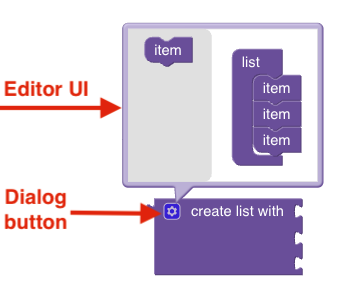
When you create a mutator, you define the certain functions that specify how the mutator should serialize and deserialize the state of the block, as well as how the mutator should compose and decompose the block's shape in the UI. As with any mixin, you'll also need to register the mutator before you can reference it in your block's JSON definition.
For more details about when and how to use mutators, see the Mutators guide.