Image fields
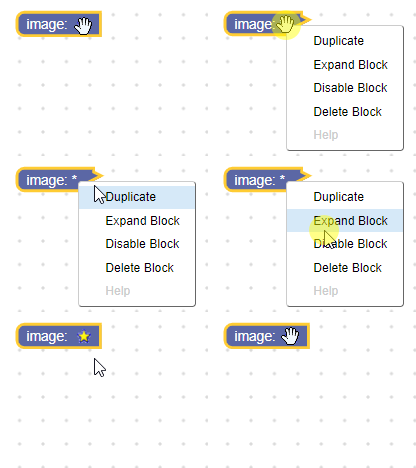
An image field stores a string as its value and a string as its text. Its value is the src of the image, while its text is an alt string describing/representing the image. The alt text is also displayed when the parent block is collapsed.
Image field

Image field on collapsed block

Creation
- JSON
- JavaScript
{
  "type": "example_image",
  "message0": "image: %1",
  "args0": [
    {
      "type": "field_image",
      "src": "https://www.gstatic.com/codesite/ph/images/star_on.gif",
      "width": 15,
      "height": 15,
      "alt": "*"
    }
  ]
}
Blockly.Blocks['example_image'] = {
  init: function() {
    this.appendDummyInput()
      .appendField("image:")
      .appendField(new Blockly.FieldImage(
        "https://www.gstatic.com/codesite/ph/images/star_on.gif",
        15,
        15,
        "*"));
  }
};
The image constructor takes in:
| Parameter | Description |
|---|---|
src | A string that points to a raster image file. |
width | Must cast to a non-zero number. |
height | Must cast to a non-zero number. |
opt_alt | (Optional) A string that accurately describes/represents the image. If it is null or undefined an empty string will be used. |
opt_onClick | (Optional) A function to call when the field is clicked. |
opt_flipRtl | (Optional) A boolean. If true, the image is flipped across the vertical axis when in right-to-left mode. Defaults to false. Useful for "turn left" and "turn right" icons. |
Serialization
Image fields are not serializable.
Accessibility
An image field's ARIA label is image: <alt text>. The alt text is also
displayed when the parent block is collapsed.
Clickable images have an ARIA role of button. Image fields that do not have
click handlers have an ARIA role of none.
Follow AFB guidelines
for writing good alt text. Return null or undefined to indicate a purely decorative image.
Click handler
For information on validators in general see Validators.
The image field does not accept a validator; instead it explicitly accepts a function that is called whenever the field is clicked. This means that images can act like buttons that exist on blocks.
The on click handler can be set in the JavaScript Constructor or
using the
setOnClickHandler
function.
Here is an example of an on click handler that collapses the block when called.
function() {
    this.getSourceBlock().setCollapsed(true);
}