@blockly/field-multilineinput

A Blockly multiline input field and associated block.
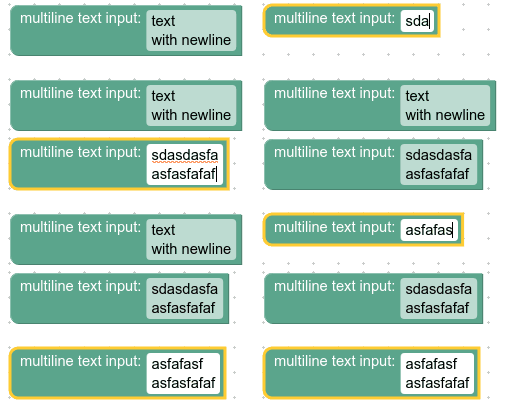
Multiline input field

Multiline input field with editor open

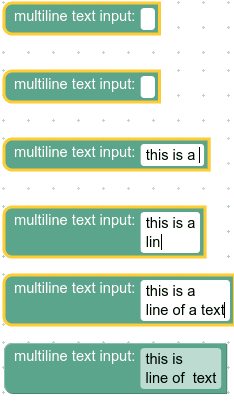
Multiline input on collapsed block

Installation
Yarn
yarn add @blockly/field-multilineinput
npm
npm install @blockly/field-multilineinput --save
Usage
This plugin adds a field of type FieldMultilineInput that is registered with
the name 'field_multilinetext'. It is a subclass of Blockly.FieldInput.
This field stores a string as its value and a string as its text. Its value is always a valid string, while its text could be any string entered into its editor. Unlike a text input field, this field also supports newline characters entered in the editor.
Editor keyboard shortcuts
The default keyboard mapping is:
| Key | Action |
|---|---|
| Enter | Commit the value and close the editor |
| Shift+Enter | Insert a newline at the cursor |
| Escape | Revert to the original value and close the editor |
With FieldMultilineInput.enterCommits = false the mapping is swapped:
| Key | Action |
|---|---|
| Enter | Insert a newline at the cursor |
| Shift+Enter | Commit the value and close the editor |
| Escape | Revert to the original value and close the editor |
enterCommits and showHint are global (static) settings that apply to all
fields. Set them once before creating your blocks:
import {FieldMultilineInput} from '@blockly/field-multilineinput';

FieldMultilineInput.enterCommits = false; // default: true
FieldMultilineInput.showHint = false; // default: true
The constructor for this field accepts three optional parameters:
value: The default text. Defaults to"".validator: A function that is called to validate what the user entered.config: An object with optional properties:maxLines: The maximum number of lines displayed before scrolling functionality is enabled. Defaults toInfinity.spellcheck: Whether spell checking is enabled. Defaults totrue.tooltip: A tooltip.
If you want to use only the field, you must register it with Blockly. You can
do this by calling registerFieldMultilineInput before instantiating your
blocks. If another field is registered under the same name, this field will
overwrite it.
JavaScript
import * as Blockly from 'blockly';
import {registerFieldMultilineInput} from '@blockly/field-multilineinput';

registerFieldMultilineInput();
Blockly.Blocks['test_field_multilineinput'] = {
  init: function () {
    this.appendDummyInput()
      .appendField('multilineinput: ')
      .appendField(
        new FieldMultilineInput('some text \n with newlines'),
        'FIELDNAME',
      );
  },
};
JSON
import * as Blockly from 'blockly';
import {registerFieldMultilineInput} from '@blockly/field-multilineinput';

registerFieldMultilineInput();
Blockly.defineBlocksWithJsonArray([
    {
        "type": "test_field_multilinetext",
        "message0": "multilineinput: %1",
        "args0": [
            {
                "type": "field_multilinetext",
                "name": "FIELDNAME",
                "text": "some text \n with newlines"
            }
    }]);
Customization
Spellcheck
The setSpellcheck function can be used to set whether the field spellchecks
its input text or not. Spellchecking is on by default.
This applies to individual fields. If you want to modify all fields change the
Blockly.FieldMultilineInput.prototype.spellcheck_ property.
Validation
A multiline text input field's value is a string, so any validators must accept
a string and return a string, null, or undefined.
Here is an example of a validator that removes all 'a' characters from the string:
function(newValue) {
  return newValue.replace(/a/gm, '');
}
Serialization
JSON
The JSON for a multiline text input field looks like so:
{
  "fields": {
    "FIELDNAME": "line1\nline2"
  }
}
where FIELDNAME is a string referencing a multiline text input field, and the
value is the value to apply to the field. The value follows the same rules as
the constructor value.
XML
The XML for a multiline text input field looks like so:
<field name="FIELDNAME">line1&#10;line2</field>
where the field's name attribute contains a string referencing a multiline
text input field, and the inner text is the value to apply to the field. The
inner text value follows the same rules as the constructor value.
Blocks
This package also provides a simple block containing a multiline input field. It has generators in JavaScript, Python, PHP, Lua, and Dart.
You can install the block by calling textMultiline.installBlock().
This will install the block and all of its dependencies, including the
multiline input field. When calling installBlock you can supply one or
more CodeGenerator instances (e.g. javascriptGenerator), and the install
function will also install the correct generator function for the
corresponding language(s).
import {javascriptGenerator} from 'blockly/javascript';
import {dartGenerator} from 'blockly/dart';
import {phpGenerator} from 'blockly/php';
import {pythonGenerator} from 'blockly/python';
import {luaGenerator} from 'blockly/lua';
import {textMultiline} from '@blockly/field-multilineinput';

// Installs the block, the field, and all of the language generators.
textMultiline.installBlock({
  javascript: javascriptGenerator,
  dart: dartGenerator,
  lua: luaGenerator,
  python: pythonGenerator,
  php: phpGenerator,
});
API reference
Instance methods:
setMaxLines: Sets the maximum number of displayed lines before scrolling functionality is enabled.getMaxLines: Returns the maximum number of displayed lines before scrolling functionality is enabled.setSpellcheck: Sets whether spell checking is enabled.getSpellcheck: Returns whether spell checking is enabled.
Static (global) properties:
FieldMultilineInput.enterCommits: Whether pressing Enter commits the value (true, default) or inserts a newline (false). Applies to all fields.FieldMultilineInput.showHint: Whether the keyboard-shortcut hint bar is shown in the editor. Whenfalse, no space is reserved for the hint bar. Applies to all fields.
License
Apache 2.0
A Blockly multilineinput field.
Namespaces
| Namespace | Description |
|---|---|
| textMultiline | - |
Classes
| Class | Description |
|---|---|
| FieldMultilineInput | Class for an editable text area input field. |
Interfaces
| Interface | Description |
|---|---|
| FieldMultilineInputConfig | Config options for the multiline input field. |
| FieldMultilineInputFromJsonConfig | fromJson config options for the multiline input field. |
Type Aliases
| Type Alias | Description |
|---|---|
| FieldMultilineInputValidator | A function that is called to validate changes to the field's value before they are set. |
Variables
| Variable | Description |
|---|---|
| installAllBlocks | - |
Functions
| Function | Description |
|---|---|
| registerFieldMultilineInput | Register the field and any dependencies. |